
Logseq Copilot 2.0
Logseq Copilot 2.0 is a rebuild of the extension on WXT. It brings a sidebar for the page you are reading, a redesigned card on search result pages, Brave Search, recall rule scopes, a new look, and a stricter way of mounting the extension’s UI in the pages you visit. It also fixes a long list of clipping and search problems. This post covers what changed.
File graphs and DB graphs
Section titled “File graphs and DB graphs”Logseq Copilot works with file graphs (Logseq 0.10.x) and DB graphs (Logseq 2.x). It asks Logseq which kind of graph is open each time it searches, so there is no setting to switch. Move from one graph type to the other and the next search uses the right one.
DB graph support already existed in 1.x. What 2.0 adds is coverage and fixes. CI now runs integration tests and browser end-to-end tests against a real Logseq. The end-to-end runs use 0.10.15 for file graphs and 2.0.2 for DB graphs. Along the way we fixed DB search, URL lookup and TODO toggling. On a DB graph a task’s state is a property rather than text in the block, so the extension maps TODO, DOING, DONE and CANCELED onto Logseq’s built-in statuses.
Firefox
Section titled “Firefox”2.0 sets a minimum Firefox version: 127. MV3 host permissions are only granted at install time from 127 on, and the extension needs them on every site. The Firefox manifest now also declares that the extension collects no data.
The end-to-end suite runs in Firefox as well as Chromium, against both graph types. 2.0 also removes Chromium-only assumptions, including how a click on a highlight is resolved to a text position. There is no Safari build; see Installation.
Highlights in the browser sidebar
Section titled “Highlights in the browser sidebar”When you clip a text selection, the extension also saves it as a highlight on the page. The highlights of the page you are reading are listed in your browser’s own sidebar: the side panel in Chrome and Edge, the sidebar in Firefox. The list follows the active tab and stays open when you switch tabs. Click a highlight to jump to it on the page, edit its note, or delete it.
The toolbar icon opens this sidebar. The 1.x popup is gone, because the sidebar does what it did: below the highlights it lists the notes in your graph that mention the page, and its header has a search of your graph and the Clip page and Clip selection buttons. In Firefox, click the icon again to close it.
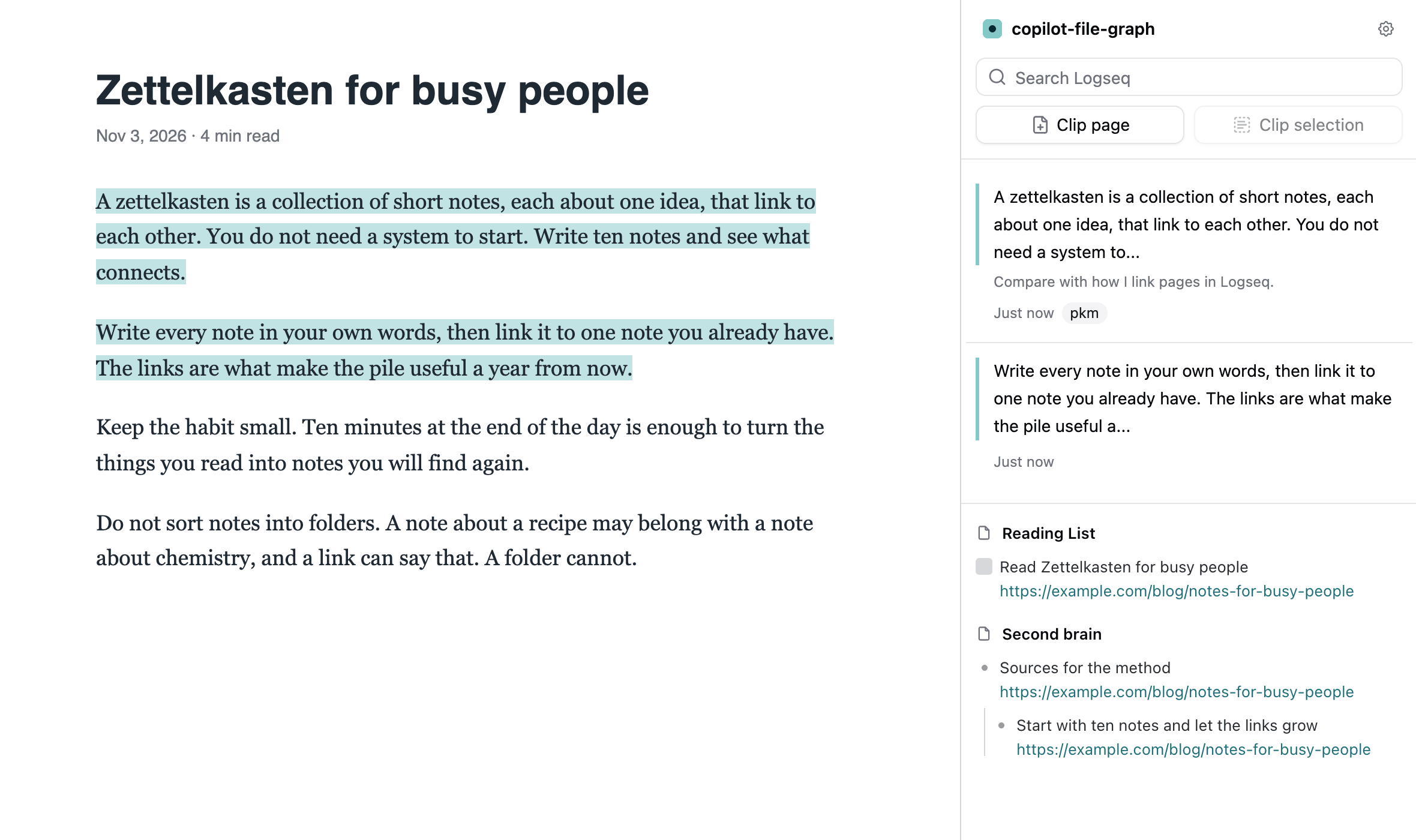
Browsers without a sidebar of their own get the same sidebar drawn on the right side of the page. Arc has a side panel but never shows it, so the extension detects Arc and uses the sidebar on the page there until you choose otherwise. In other browsers you can switch to it under Settings, Sidebar, In-page sidebar. See Sidebar.
Highlights are stored in your browser only. They are not written to Logseq. The clipped text still goes to Logseq as before. Highlights in the browser sidebar walks through the whole workflow.
Search result pages
Section titled “Search result pages”The card next to your search results is redesigned. It groups what it finds by page, shows the best blocks of each page, and for a block deep in an outline it adds a gray line with its parent, so you can tell where it sits. Click a page, a block or a parent line to open it in Logseq. See Search Engines.
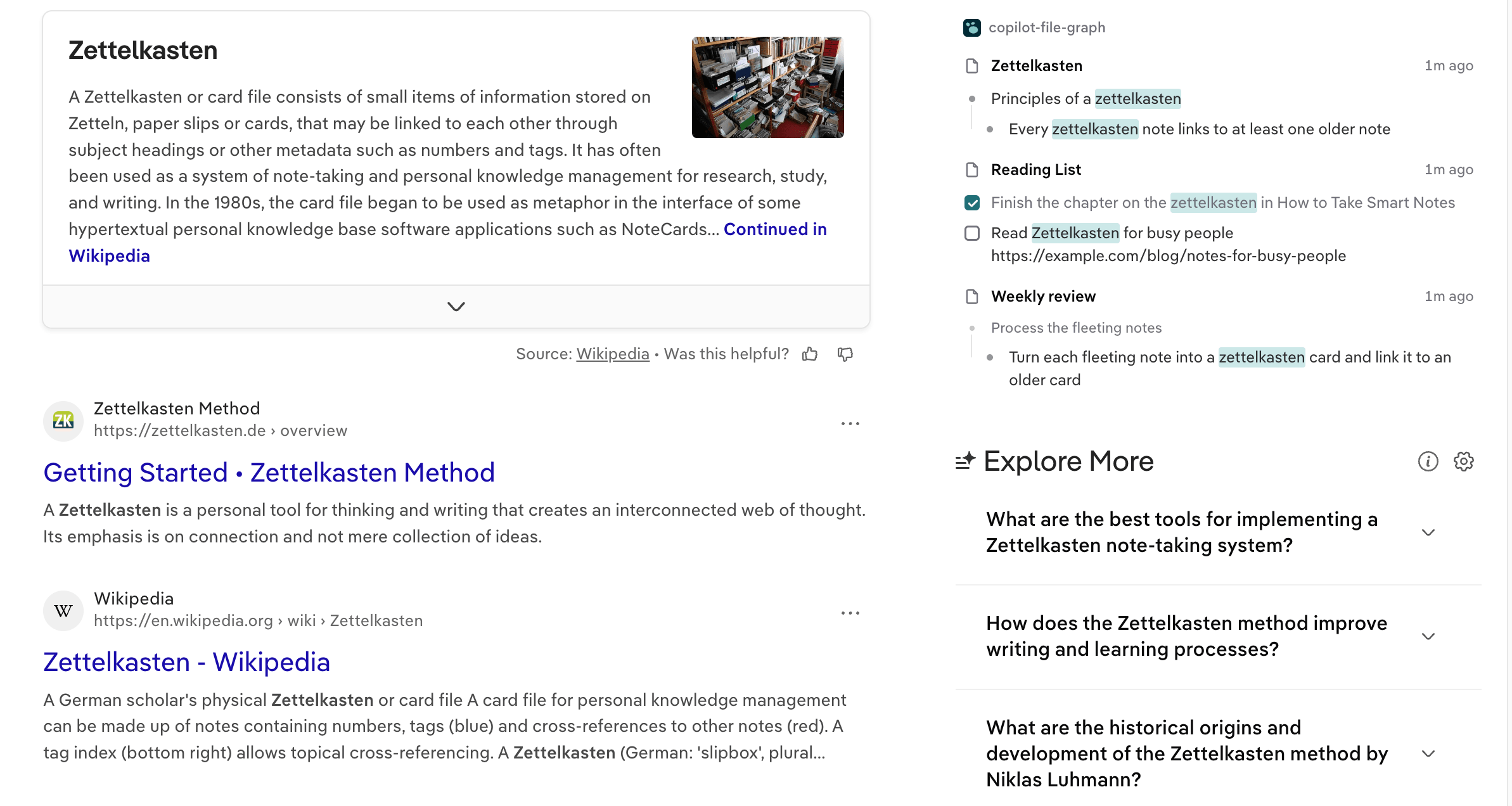
- Brave Search is a new built-in engine (#69).
- The Kagi card now fits the results page (#81).
- The card shows again on Startpage’s new layout and on Bing’s layout that drops unknown classes. A Bing result page that loads twice no longer searches Logseq twice.
- On a file graph, the card finds more than the first 10 blocks that Logseq’s own search returns.
Clipping
Section titled “Clipping”- A clip uses your graph’s journal date format (#77).
- You can clip a selection where the extension cannot run in the page, such as the browser’s PDF viewer (#60). Use the right-click menu.
- When a clip fails, you now see why, wherever you clipped from: a message on the page, an error under the sidebar buttons, or a
!on the toolbar icon where no page script runs (#48). - A failed connection names the address that was tried and the HTTP status, and says whether the token is wrong (#80).
Recall rules
Section titled “Recall rules”Recall rules change how the extension searches your graph for pages that match a URL pattern. A rule can:
- drop the URL hash or query string before searching, and ignore chosen path segments;
- exclude or prefer keywords;
- search only some Logseq pages, or skip others;
- recall notes about more than the page itself, up to its parent paths (the scope);
- cap the number of results, or put recent ones first.
A rule’s scope sets how many levels of the address it recalls: this page only, or up to three levels. The rule editor shows the broadest path a rule recalls for a test address.
Two rules ship by default. “Single-page apps” is on and ignores the URL hash. “GitHub Pull Request” is off. On pull request and issue pages it recalls notes about the same repository, not only the page itself. A rule you edited keeps your edits. Add, edit and test rules under Recall Rules in the extension options. Rules apply to the notes lookup for the current page, to the results next to your search engine, and to the count on the toolbar badge. When several rules match the same page, they are combined.
Page scopes compare exact page names, ignoring case and surrounding spaces, so excluding “Work” does not hide “Homework”. If a result’s page name cannot be determined while a scope is active, the result is dropped instead of shown.
Privacy
Section titled “Privacy”The extension draws some UI inside the pages you visit: search results next to your search engine, the clip button and the highlight comment popup. That UI lives in shadow roots. In packaged builds the roots are now closed, so a script on the page cannot reach into them through element.shadowRoot. Development and test builds keep them open, and a test checks that the packaged build exposes shadowRoot === null.
Related changes: the content script no longer trusts DOM events that a page script could dispatch, and uses an in-memory channel instead. Closed roots do not change what the extension can access. It still has host access to all sites, as in 1.x, and sends data only to the Logseq API server you configure.
The extension’s styles no longer leak into the pages you visit either. Before, a page that used Tailwind could lose some of its own styles to the extension (#79).
New UI
Section titled “New UI”The orange theme is replaced by Logseq teal, about #206f78 in light mode and #85c8c8 in dark mode. The browser sidebar and the options pages follow your system’s dark mode, and highlights on the page use the teal on both light and dark pages. The options pages are flat, with plain lists instead of nested cards, and are capped at a centered 768 px width. The built-in recall rules now have English names and descriptions.
Smaller changes
Section titled “Smaller changes”- Block text on the card and in the sidebar keeps its line breaks, and DB graph tags and page references show their names.
- The options page checks the connection as you type, and shows the extension version in its sidebar.
Get it
Section titled “Get it”Install from the store for your browser on the Installation page, then follow the Setup guide if this is a fresh install. The code, release notes and issue tracker are on GitHub. Questions and bug reports are welcome in Discussions.